Technically no — a powered studio monitor will make sound from a laptop headphone jack through a 3.5 mm-to-TRS adapter. Practically yes, because what monitors want is a balanced output, and a headphone jack is unbalanced. The balanced connection is what cancels the hum and interference a cable picks up between your computer and your speakers, and it is the one thing no adapter can add.
Most studio monitors are active: each cabinet has its own amplifier, so there is no separate amp to buy. What they expect at the input is a line-level balanced signal on XLR or TRS. An audio interface's main outputs are exactly that. Do studio monitors need an amplifier covers the active-versus-passive question, which is the other half of this one.
What balanced actually means, and why it removes hum
An unbalanced cable carries the signal on one conductor and ground on the other. Any interference the cable picks up along the way — from a power supply, a phone charger, a monitor's backlight, the fridge — rides along with the signal and arrives at the speaker as noise.
A balanced cable carries the signal twice, once inverted. Interference hits both conductors roughly equally, and the receiving input flips one back and sums them, which cancels anything common to both and leaves the signal. That is the whole mechanism, and it is why a balanced run survives distances an unbalanced one does not.
The audible result in a home studio is specific: a hum or buzz that changes when you touch the cable, or a faint whine that tracks what the computer is doing. Those are the symptoms of an unbalanced run, and they are the reason this question usually gets asked after the monitors have already arrived.
What a headphone-jack adapter does and does not give you
- It gives you sound. A 3.5 mm-to-dual-TRS or 3.5 mm-to-dual-XLR cable will drive active monitors to a usable level.
- It does not give you a balanced connection. The adapter splits an unbalanced stereo signal into two unbalanced mono ones. It cannot invent the inverted conductor.
- It does not give you a ground isolation point, so a ground loop between the computer's power supply and the monitors' has nowhere to break.
- It does not give you a reliable volume reference. The computer's output stage is in the path, so its software volume sets your monitoring level — and that is the same slider that affects every other sound on the machine.
- It does not give you line level. A headphone output is designed to drive headphones, so matching it to a line input means running the computer's volume at an arbitrary setting and hoping.
In a quiet electrical environment, with short cables, this works and sounds fine. In a room with a desktop PC, a monitor, a phone charger and a desk lamp on the same circuit, it frequently does not — and the failure mode is a noise floor you cannot mix against.
The volume-control problem people underestimate
Monitoring is only useful if the level is repeatable. If today's mix was judged at one software volume and tomorrow's at another, you are comparing two different things, and the low end in particular will read differently because human hearing is less sensitive to bass at lower levels.
An interface puts a physical monitor knob in the path, which makes a consistent reference level trivial to return to. A software slider shared with your notification sounds does not. How loud should studio monitors be covers what that reference level should be and why it matters more than it sounds.
What this looks like in practice
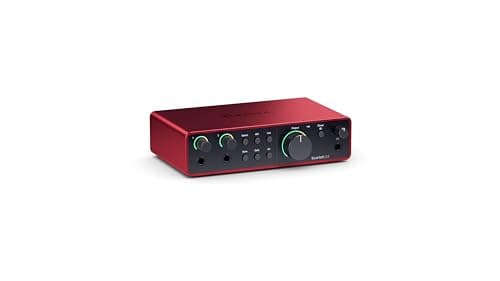
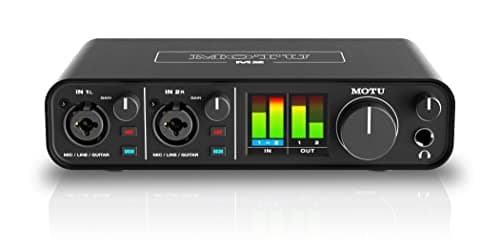
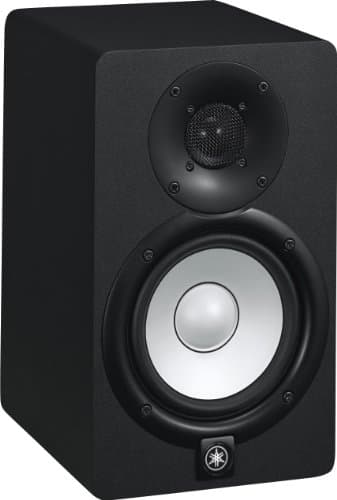
Two interfaces with balanced main outputs and a hardware monitor knob, and the monitor most of this site's readers end up pairing with one.
Focusrite Scarlett 2i2 (4th Gen)
Top pickFocusrite · The most gain per dollar in a two-input box
The default answer for someone buying an SM7B or PodMic: it supplies enough clean gain that you never need a booster, which makes it the cheaper total purchase even when it is not the cheaper box. Look elsewhere only if you need MIDI or four outputs.
Why it is here
- 69 dB is the most gain of any interface at this price, and enough for an SM7B with headroom to spare
- 120 dB dynamic range means the converters are not the weak link
- Two inputs, so a second person does not mean a second purchase
What it costs you
- Air mode is a fixed voicing, not an EQ you can dial
- Plastic-and-metal build feels less solid than the SSL or Audient competition
- No MIDI, which matters if you also play keys
MOTU M2
MOTU · The best converters and metering at the price
The pick if you care most about conversion quality and want to see your levels without alt-tabbing. If your mic is an SM7B and you want a published gain number you can check against the mic's sensitivity, the 2i2 is the safer buy.
Why it is here
- -129 dB EIN is genuinely quiet, and it shows on low-output dynamics
- Full-color LCD metering on the box is more useful day to day than any software mixer
- Independent phantom power and monitor switching per input
What it costs you
- MOTU does not publish a maximum mic-gain figure the way Focusrite does, so gain headroom is harder to plan around
- No onboard voicing or DSP at all
- Loopback needs the software, not a front-panel switch
Yamaha HS5
Yamaha · The flat midrange reference for a small room
The right monitor for an untreated or lightly treated small room, precisely because it does not pretend to have low end your room could not reproduce honestly anyway. If you need to hear below 74 Hz, add a treated room before you add a bigger speaker.
Why it is here
- The honest -3 dB figure of 74 Hz tells you what it will not do, which is rarer than it should be
- Midrange is flat and unflattering, which is the entire job of a monitor
- Small enough to sit at ear height on a desk without dominating the room
What it costs you
- Nothing below about 74 Hz, so you mix low end by trust rather than by ear
- Unforgiving — a rough mix sounds rough, which some people hate
- Rear port needs clearance from the wall
When you genuinely do not need one
- You listen rather than record. If the monitors are desk speakers for music and video, an adapter from a quiet laptop is perfectly reasonable and a DAC may serve you better than an interface. Audio interface vs DAC.
- You already own something with balanced outputs. A mixer, a monitor controller or an older interface already solves this.
- Your monitors have a USB input. A few do, which bypasses the whole question by putting the converter in the speaker.
- You mix on headphones. Then the headphone output is the relevant spec, not the line outputs. How to mix with headphones only.
What to look for if you are buying one
- Balanced main outputs, on TRS or XLR. Every interface on this site has them; it is still the first row to check.
- A hardware monitor knob that controls only the speakers, separately from the headphone level.
- Enough mic gain for the microphone you own, since you are buying a preamp at the same time. How much clean gain do you need.
- A headphone output that drives your headphones, because you will check mixes on both.
And before spending on the chain, be clear about what it will and will not fix. A balanced output removes electrical noise. It does nothing about room modes, which are the reason most small-room monitoring is untrustworthy below 200 Hz. Best studio monitors for an untreated room and studio monitor placement are where that money goes.