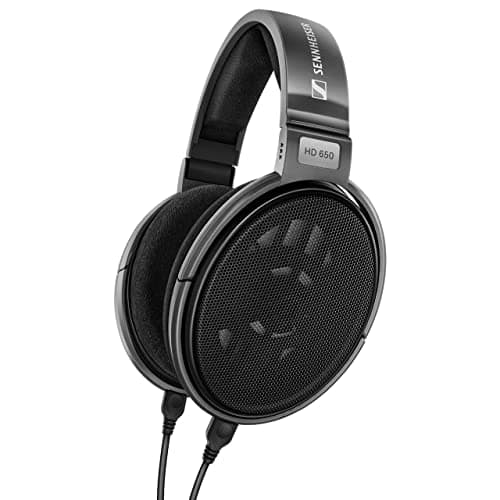
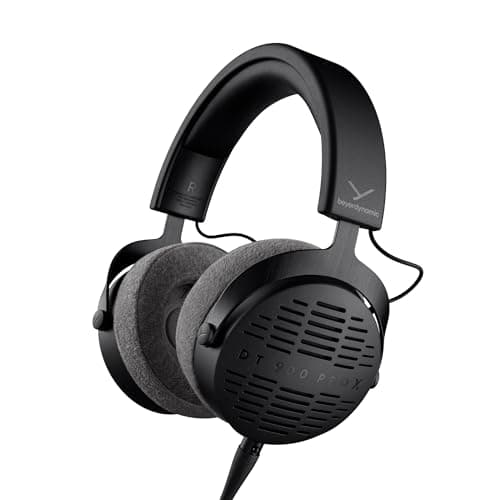
Mix low end on headphones by replacing feel with evidence: check against two reference tracks you know, watch a spectrum analyser rather than trusting your ears below 80 Hz, sum to mono to catch phase cancellation, high-pass every track that is not meant to carry bass, and confirm the result on a phone speaker before you finish. Open-back headphones with a flat midrange — a Sennheiser HD 650 or a Beyerdynamic DT 900 Pro X — make all five easier.
Headphones have one enormous advantage for bass work: they remove the room. No room modes, no 10 dB peaks and nulls below 200 Hz, no boundary lift from a desk. In an untreated bedroom that is a genuinely better starting point than monitors, which is why how to mix with headphones only is not a compromise article.
They also have one specific disadvantage, and it is in exactly the band this page is about. Bass on speakers is partly a physical sensation — pressure on your chest and in the room — and headphones cannot produce that. So your brain gets less information about the bottom octave than it is used to, and compensates by wanting more of it. That is the mechanism behind almost every bass-heavy headphone mix.
Why bass reads wrong on headphones
- No body conduction. On speakers, below roughly 100 Hz you feel as much as you hear. Headphones deliver only the ear path, so the same level feels smaller and you turn it up.
- No crossfeed. On speakers each ear hears both channels. On headphones each ear hears one, which exaggerates stereo width and makes a wide, out-of-phase bass sound bigger than it will be anywhere else.
- Driver response at the extremes. Many headphones roll off or peak in the bottom octave, and the seal around your ear changes that response — glasses, hair and how hard the pads press all shift it.
- No room to tell you about mud. A room reveals a build-up around 150 to 250 Hz by making it uncomfortable. Headphones present it politely, so it survives into the master.
None of these is fixable by buying better headphones. They are fixable by replacing the judgement you cannot make with measurements and references you can.
The five checks, in order
- Two reference tracks, loudness-matched. Pick commercial releases in your genre that you have heard on many systems, import them into the session, and match their loudness to your mix before comparing. Unmatched comparison tells you nothing except which is louder.
- A spectrum analyser on the master, with a long average. You are not looking for a shape to copy; you are looking for whether there is energy where you think there is, and whether the 20 to 30 Hz region contains rumble you cannot hear.
- Sum to mono and listen to the bass. If the low end loses level in mono, something down there is out of phase, and headphones will not reveal it otherwise. Fix it by mono-ing everything below roughly 120 Hz.
- High-pass everything that should not carry bass. Vocals, guitars, overheads, room mics. Most headphone mixes are muddy because of accumulated low-frequency energy in tracks nobody intended to be bassy, and the high-pass is more effective than any amount of EQ on the bass itself.
- Check on a phone speaker and in a car if you can. A phone speaker reproduces almost nothing below 300 Hz, which tells you whether the bass line is still audible through its harmonics when the fundamental is gone.
That sequence is the whole method. Everything else on this page is about making each of the five easier.
Which headphones help, and why open-back
Open-back designs have a less pressurised, more consistent low-frequency response and far less seal dependency than closed-backs, which makes the bottom end more repeatable session to session. They also leak, which is irrelevant when mixing and disqualifying when tracking with a live microphone.
The Sennheiser HD 650 is the long-standing reference here: 300 ohms, 10 Hz to 41,000 Hz, 103 dB at 1 V and total harmonic distortion under 0.05% at 1 kHz. That impedance is the catch — 300 ohms needs a headphone output with real voltage behind it, and a laptop jack will not deliver it. The Beyerdynamic DT 900 Pro X at 48 ohms gets you open-back detail without that requirement, which makes it the practical pick if your interface's headphone output is modest.
Two open-backs for low-end work, and one monitor to cross-check on
The 300 ohm reference, the 48 ohm open-back that any interface will drive, and the nearfield most readers here use as a second opinion.
Sennheiser HD 650
Top pickSennheiser · The long-standing mixing reference
Buy it for mixing if your interface can drive 300 ohms — the SSL 2+ and MOTU M2 can, a bus-powered budget box may struggle. Do not buy it as your only pair if you also track with a live mic in the room.
Why it is here
- The midrange presentation most mixing engineers have calibrated their ears against
- Open-back, so reverb depth and stereo width read honestly
- Fully serviceable — pads, cable and headband are all replaceable
What it costs you
- 300 ohms needs a headphone output with real voltage swing; a weak one sounds thin and quiet
- Open-back leaks straight into any live microphone, so it is useless for tracking
- Costs more than any other pair ranked here, and needs the output to match
Beyerdynamic DT 900 Pro X
Beyerdynamic · Open-back detail with no amplifier requirement
The right open-back if you want mixing honesty from a laptop or an interface with a weak headphone amp. The HD 650 is still the more neutral midrange if you can drive it.
Why it is here
- 48 ohms is the easiest open-back here to drive — a phone dongle manages it
- Detachable cable with two lengths in the box
- Beyerdynamic spare-part support, same as the DT 770
What it costs you
- Slightly bright, in the family tradition
- Open-back rules out tracking with a live mic
- Beyerdynamic does not publish a full response spec for this model in the same detail as the DT 770
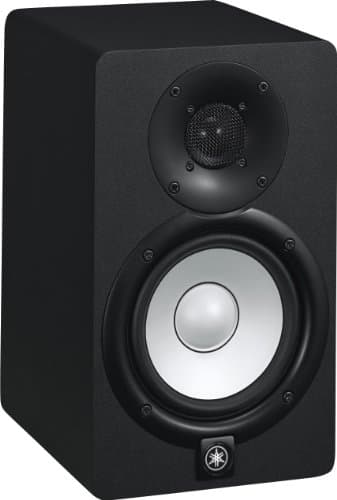
Yamaha HS5
Yamaha · The flat midrange reference for a small room
The right monitor for an untreated or lightly treated small room, precisely because it does not pretend to have low end your room could not reproduce honestly anyway. If you need to hear below 74 Hz, add a treated room before you add a bigger speaker.
Why it is here
- The honest -3 dB figure of 74 Hz tells you what it will not do, which is rarer than it should be
- Midrange is flat and unflattering, which is the entire job of a monitor
- Small enough to sit at ear height on a desk without dominating the room
What it costs you
- Nothing below about 74 Hz, so you mix low end by trust rather than by ear
- Unforgiving — a rough mix sounds rough, which some people hate
- Rear port needs clearance from the wall
What a crossfeed plugin does for bass
Crossfeed feeds a small, slightly delayed amount of each channel into the opposite ear, approximating what happens naturally with speakers. For low-end work its value is specific: it stops you from mistaking an extremely wide low end for a big one.
It is a monitoring tool and not a mix process, so it belongs on the monitoring path, after the master, bypassed on export. Used that way it makes the mono check less surprising, because you are hearing some of that summing all along.
Why one pair of monitors is still worth having
Headphones and monitors fail differently, and that is exactly why owning both is useful. A headphone mix tends to be bass-heavy and over-wide. A small-monitor mix in an untreated room tends to be bass-light in some spots and bass-heavy in others, depending on where the room's nulls fall.
A 5-inch nearfield like the Yamaha HS5 rolls off at 74 Hz by its own published -3 dB figure, which sounds like a limitation and is useful here: it tells you about the 100 to 250 Hz mud region with great clarity, and declines to have an opinion about the octave below. Used as a second opinion rather than a primary reference, that is a good division of labour. Studio monitors vs headphones for mixing covers the full comparison.
If you can treat the room, do — best bass traps are the only treatment that works in this band, and once the corners are controlled a monitor like the Kali IN-5 becomes a far more useful bass reference than any headphone.
Common mistakes
- Boosting the sub to feel it. You cannot feel it on headphones at any level. Judge it on the analyser and the references instead.
- Wide stereo bass. Keep everything below roughly 120 Hz mono. It survives every playback system and sounds larger, not smaller.
- Using a bass-boosted consumer headphone as the reference. A closed-back tuned for listening will lead you to under-deliver low end everywhere else.
- Skipping the mono check. It is the single fastest way to catch a phase problem headphones actively hide.
- Mixing at a different level every day. Your bass balance will follow the volume knob, not your intentions.