Up to roughly the $400 to $500 per-pair tier, yes — more money buys real low-frequency extension, a dedicated midrange driver and more amplifier headroom, and all three change what you can hear. Above that, in an untreated domestic room, almost nothing. Room modes cause 10 dB or more of variation below 200 Hz, which is larger than the difference between a good monitor and an excellent one, and no monitor corrects it.
This is an unsatisfying answer because it points away from the purchase. It is also the one supported by the numbers, and the numbers are worth walking through rather than asserting — because the specific things more money buys are identifiable, and you can decide for yourself whether they apply to your room.
What more money actually buys
Three things are being bought across those four rows, and they are all genuine.
- Low-frequency extension. The HS5's -3 dB point is 74 Hz; the LP-6 V2's +/-3 dB point is 47 Hz. That is most of an octave of bass you can hear rather than infer, and for anyone producing music it is the single most valuable upgrade on this list.
- A dedicated midrange driver. In a two-way, one driver makes both the kick and the vocal, and the interaction between those jobs smears the midrange. The IN-5 crosses over at 280 Hz and 2,800 Hz so each driver does one thing.
- Amplifier headroom. 160 W tri-amped against 70 W bi-amped is not about volume; it is about the amplifier never being the thing that compresses a transient.
Notice what is not on that list: better converters, nicer cabinets, prettier finishes, brand reputation. Those exist further up the range and they are not what changes your mix decisions.
Where the returns stop, and why it is the room
In a rectangular room of bedroom dimensions, standing waves between parallel surfaces create a comb of peaks and nulls through the bottom two octaves. The practical consequence is 10 dB or more of variation at the listening position, and sometimes a null deep enough that a bass note genuinely disappears at one chair height and returns at another.
That figure is the ceiling on what any monitor upgrade can give you, because it is larger than the entire published difference between the four monitors in the table above. A more accurate monitor in that room produces a more accurate rendering of a response curve the room has already ruined.
There is a second-order problem too: a monitor that reaches lower excites more modes. So buying extension for an untreated room can make the low end harder to judge rather than easier, which is the honest reason the HS5 remains a sensible purchase for a bad space. Best studio monitors for an untreated room is built around exactly that trade-off.
The ladder, and where each rung earns its money
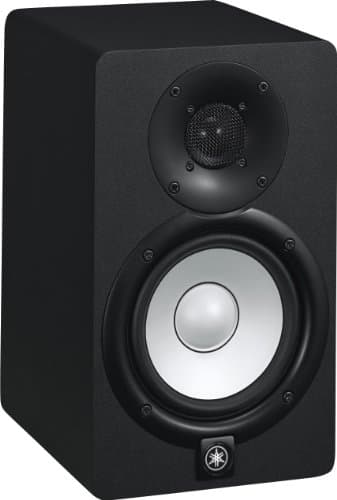
Yamaha HS5
Top pickYamaha · The flat midrange reference for a small room
The right monitor for an untreated or lightly treated small room, precisely because it does not pretend to have low end your room could not reproduce honestly anyway. If you need to hear below 74 Hz, add a treated room before you add a bigger speaker.
Why it is here
- The honest -3 dB figure of 74 Hz tells you what it will not do, which is rarer than it should be
- Midrange is flat and unflattering, which is the entire job of a monitor
- Small enough to sit at ear height on a desk without dominating the room
What it costs you
- Nothing below about 74 Hz, so you mix low end by trust rather than by ear
- Unforgiving — a rough mix sounds rough, which some people hate
- Rear port needs clearance from the wall
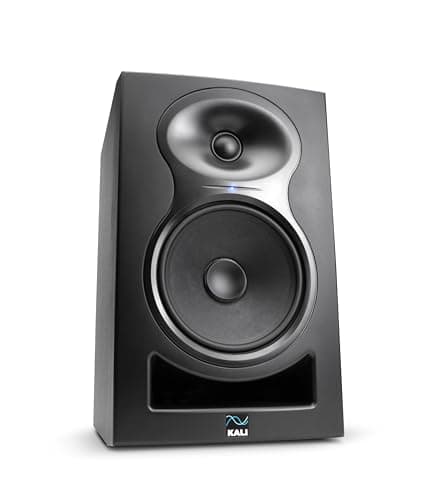
Kali Audio LP-6 V2
Kali Audio · The most low end per dollar, with boundary EQ
The best value here if you set the boundary EQ honestly and have corner traps in. In a bare bedroom with the switches left at default, the extra low end makes your mixes worse, not better, and the HS5 is the wiser buy.
Why it is here
- 47 Hz at +/-3 dB is real low end, not a marketing figure
- Boundary EQ switches on the back are the only honest answer to a speaker jammed against a wall
- 115 dB max SPL means huge headroom for a desk speaker
What it costs you
- That low-end reach is a liability in an untreated room — you will chase room modes, not mix decisions
- 6.5-inch driver in a small room needs the boundary EQ set correctly or it is worse than an HS5
- Paper cone is more fragile than the alternatives
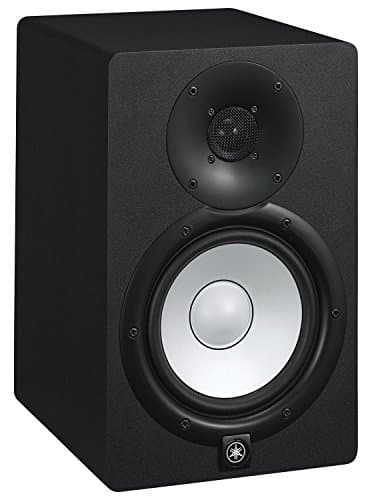
Yamaha HS7
Yamaha · The HS voicing with usable low end
The upgrade once the room has bass traps in the corners. Bought before the treatment, it will simply show you your room's problems louder — which is why the HS5 is the better first monitor in a bare room.
Why it is here
- The same flat voicing as the HS5 with meaningfully more low-frequency reach
- 95 W means it stays clean at the level you actually mix at
- 2 kHz crossover keeps the vocal range on one driver
What it costs you
- A 6.5-inch woofer in an untreated bedroom excites room modes the HS5 never touches
- Needs more distance from the wall and from you than most desks allow
- Costs and weighs noticeably more than the HS5
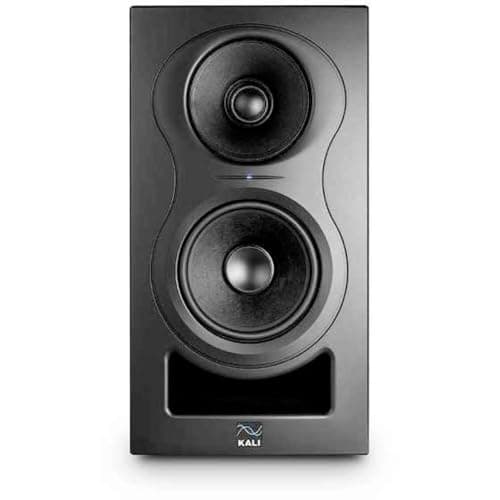
Kali Audio IN-5
Kali Audio · A coincident three-way at a two-way price
The pick if you sit close, move around while working and want a stable stereo image — that is exactly what coincident drivers buy. If your room is untreated, spend the difference on panels first; the IN-5 will not out-engineer your walls.
Why it is here
- The coincident mid and tweeter share an acoustic center, so the image does not move as you do
- Crossing over at 280 Hz keeps the woofer out of the vocal range entirely
- 160 W tri-amped, with the same boundary EQ as the LP-6
What it costs you
- Three-way complexity in a small room is often solving a problem the room is causing
- Deep cabinet needs a proper stand, not a desk edge
- Meaningfully more money than the LP-6 for the same published bandwidth
The free upgrades to do first
- Get the tweeters to ear height, on stands or isolation, and off the desk surface. A desk bounce arriving a millisecond after the direct sound causes comb filtering through the midrange that no monitor is immune to. Monitor isolation pads vs stands.
- Make the setup symmetrical. Equal distances to the side walls, an equilateral triangle with your head. Asymmetry puts the two speakers in different acoustic environments, which destroys the stereo image before the speakers get a chance.
- Move away from the wall behind them. A speaker close to a boundary gets a broad low-frequency lift you will mistake for extension. Studio monitor placement has the geometry.
- Set a reference level and keep it. Your bass balance tracks the volume knob because hearing is less sensitive to low frequencies at low levels. How loud should studio monitors be.
All four of those are free, all four are larger in effect than one rung on the monitor ladder, and all four are skipped by most people who ask this question.
When expensive monitors genuinely are worth it
- The room is treated. Corner traps, first reflection points, something on the ceiling. Then extension and midrange resolution become audible assets rather than theoretical ones.
- You produce bass-heavy music. If the bottom octave is the content, a monitor that reaches it is not a luxury.
- You work long hours. Lower distortion and more headroom are less fatiguing, which is a real benefit that does not show up in a frequency response.
- You are mixing for other people. Decisions you cannot verify become somebody else's problem, and that changes the risk calculation.
And when they are not: a small untreated room, mostly spoken-word or podcast work, or a setup where the speakers must sit flat on a desk against a wall. In those cases are studio monitors worth it is the prior question, and good headphones plus the method in how to mix low end on headphones will beat a monitor upgrade comfortably.
The summary worth keeping: spend up the monitor ladder until you reach a dedicated midrange driver and real low-frequency extension, then stop and spend on the room. The order matters far more than the total.