Yes, in two specific ways: an interface gives you clean preamp gain your computer does not have, and a real balanced microphone input with phantom power, which a headphone jack is not. Both change what gets recorded. What almost certainly will not change anything you can hear is the converter — every interface sold in the last decade converts far better than a domestic room reveals.
This question gets answered badly in both directions. One camp says an interface transforms your sound, which oversells it. The other says converters are all the same now so it makes no difference, which confuses one component with the whole box. The accurate answer is narrower and more useful: the parts of an interface that matter are the preamp and the input, and the part it is marketed on is the part that does not.
What genuinely changes: clean gain
A microphone preamp's job is to raise a capsule's tiny output to a usable recording level while adding as little noise as possible. How much it can raise it is the gain figure; how little it adds doing so is EIN, equivalent input noise.
The spread across interfaces is enormous. A Scarlett 2i2 publishes 69 dB of mic gain and 120 dB of dynamic range. A Universal Audio Volt 2 publishes 55 dB. That 14 dB gap is not subtle and it is not subjective: with a low-output dynamic microphone it is the difference between a clean recording and one with audible hiss under every pause, because the low-gain box has to be run at its last few decibels where its own noise floor becomes part of the signal.
So if your current recordings are hissy, thin or require a lot of normalising in the edit, an interface absolutely improves your sound quality — by supplying the gain the chain was short of. How much clean gain do you need lists the published figure for every interface on this site.
What also changes: having a real microphone input
A computer's 3.5 mm input is unbalanced, supplies plug-in power rather than 48 V phantom power, and sits inside a case full of switching noise. An interface's XLR input is balanced, which cancels interference picked up along the cable rather than amplifying it, and it supplies phantom power so a condenser capsule works at all.
That is a categorical change rather than an incremental one. Running an XLR microphone through an adapter into a laptop jack is not a worse version of the same thing; it is a different and much noisier circuit. XLR to USB adapters explained covers the in-between devices honestly, and audio interface vs sound card covers why the onboard chip is not a substitute.
What does not change: the converters
Analog-to-digital conversion is the specification every interface review leads with and the one least likely to affect your recordings. The reason is arithmetic rather than opinion: a good modern converter resolves well over 110 dB of dynamic range, and a quiet domestic room has a noise floor around 30 to 40 dB SPL. Your room runs out of silence long before the converter runs out of resolution.
That last row is worth separating out. A better headphone output does not improve the file you record — but it improves what you hear while you record it, which improves the decisions you make. A 300 ohm open-back headphone on an underpowered output is a real problem. Do studio monitors need an amplifier and best headphones for mixing cover the listening side.
The three ways to fix a gain problem
A high-gain interface, an inline booster for an interface you already own, or the best-measuring box at the price if your gain is already sufficient.
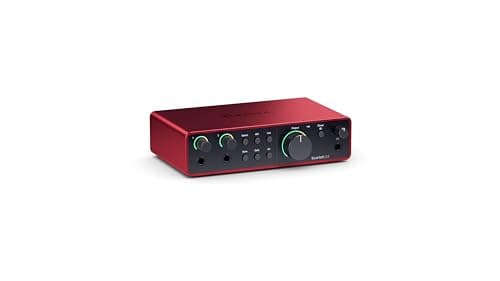
Focusrite Scarlett 2i2 (4th Gen)
Top pickFocusrite · The most gain per dollar in a two-input box
The default answer for someone buying an SM7B or PodMic: it supplies enough clean gain that you never need a booster, which makes it the cheaper total purchase even when it is not the cheaper box. Look elsewhere only if you need MIDI or four outputs.
Why it is here
- 69 dB is the most gain of any interface at this price, and enough for an SM7B with headroom to spare
- 120 dB dynamic range means the converters are not the weak link
- Two inputs, so a second person does not mean a second purchase
What it costs you
- Air mode is a fixed voicing, not an EQ you can dial
- Plastic-and-metal build feels less solid than the SSL or Audient competition
- No MIDI, which matters if you also play keys
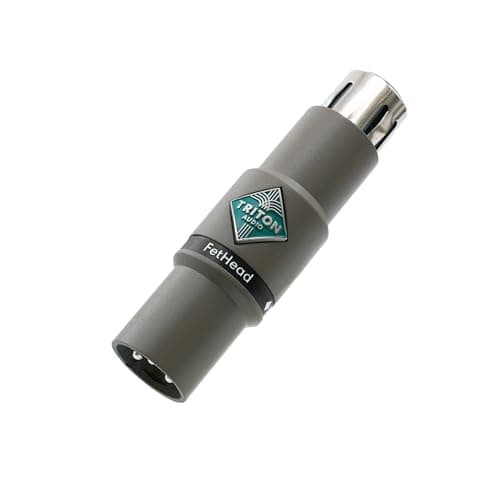
Triton Audio FetHead
Triton Audio · The most gain in the smallest package
The pick for most people boosting an SM7B or PodMic: more gain than the alternative, in nothing. Choose the Cloudlifter instead if the mic is on a long unsupported arm or if you own a ribbon.
Why it is here
- 27 dB is 2 dB more than a Cloudlifter, from something the size of a cable barrel
- 22 kohm input impedance lets a dynamic capsule behave the way its designer intended
- No desk space, no second cable
What it costs you
- Hangs off the back of the mic, adding weight and leverage to your boom arm
- Nothing to see — no LED, so a phantom-power mistake is silent
- Not for condensers, which need the phantom power it blocks
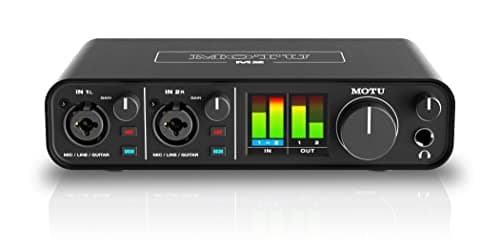
MOTU M2
MOTU · The best converters and metering at the price
The pick if you care most about conversion quality and want to see your levels without alt-tabbing. If your mic is an SM7B and you want a published gain number you can check against the mic's sensitivity, the 2i2 is the safer buy.
Why it is here
- -129 dB EIN is genuinely quiet, and it shows on low-output dynamics
- Full-color LCD metering on the box is more useful day to day than any software mixer
- Independent phantom power and monitor switching per input
What it costs you
- MOTU does not publish a maximum mic-gain figure the way Focusrite does, so gain headroom is harder to plan around
- No onboard voicing or DSP at all
- Loopback needs the software, not a front-panel switch
Diagnose before you buy
The useful move is to identify which problem you actually have, because the three symptoms point at three different purchases.
- Hiss under quiet passages, recordings too quiet. A gain problem. An interface with a higher published figure, or an inline booster in front of the one you own, fixes it.
- Boxy, hollow, distant or echoey. A room problem. No interface touches it. How to treat a room for recording is the purchase.
- Dull, harsh, or wrong in character. A microphone problem, or a placement problem. Dynamic vs condenser microphones is the place to start.
In our experience most people arriving at this question have the second problem and are shopping for a fix to the first. That is an expensive mistake and an easy one, because a room is diagnosed by listening critically to a recording rather than by reading a spec sheet.
The honest upgrade order
- Enough clean gain for the microphone you own. Non-negotiable, and cheap to check.
- Two panels at the first reflection points. The biggest single improvement most home recordings can have. Acoustic treatment on a budget.
- A microphone matched to your room, not to a review. Best XLR microphones.
- Monitoring you can trust, so you hear problems while they are still fixable.
- Converters, I/O and metering. Real improvements to the experience of working, and last in line for the recording itself.
If you have not bought an interface at all yet, do I need an audio interface covers the cases where the answer is genuinely no — and are cheap audio interfaces worth it covers the bottom of the market, which is better than its reputation.