The Focusrite Scarlett 2i2 (4th Gen) is the best audio interface for an iPad: Focusrite publishes a per-iPadOS-version compatibility table that lists it as supported, it has 69 dB of mic gain — the only figure here that clears an SM7B without a booster — and it carries a 5 V DC power port for the case where the iPad cannot feed it. If you want the smallest reliable bus-powered option instead, the Audient iD4 MKII delivers a full 48 V of phantom power per channel even when it is running on bus power alone.
Almost every interface roundup that claims to cover iPads is really a desktop roundup with the word iPad added. That is how people end up buying a box that works perfectly on a laptop and then browns out, drops phantom power or needs a mixer app that does not exist on iPadOS.
So this page ranks on the constraints that are specific to a tablet, in this order: whether the manufacturer actually documents iOS or iPadOS support, whether the iPad can supply enough power, whether phantom power survives on bus power, and whether every control you need is on the hardware rather than in a desktop app. Conversion quality is the last tiebreak, not the first, because every interface here converts well enough that you will not hear its limits.
The criteria, in the order they decide the purchase
- Documented support, not assumed support. Class-compliant operation means an interface *probably* works. A published compatibility statement means the manufacturer has tested it and will support you when it does not. That is a different thing, and it is the first filter here.
- The power budget. An iPad supplies less current over its port than a mains-powered desktop does, and a bus-powered interface that is marginal on a laptop is a coin flip on a tablet. The best answer is an interface that either draws very little or has somewhere to plug external power in.
- Phantom power while bus powered. 48 V is generated inside the interface from whatever the port gives it. This is the first thing to sag when power is tight, and a condenser microphone on sagging phantom power sounds thin and noisy rather than failing outright, which makes it hard to diagnose.
- Everything reachable from the front panel. Most control software for these boxes is macOS and Windows only. If loopback, routing or gain lives in an app you cannot install, you do not have that feature on an iPad.
- The connector you actually have. A USB-C iPad takes a USB-C interface directly. An older Lightning iPad needs Apple's Lightning to USB Camera Adapter and, on some interfaces, external power as well.
- Mic gain against the microphone you already own. The spread in this group is 55 dB to 69 dB, and that decides whether a low-output broadcast dynamic works at all.
Seven interfaces with documented iPadOS support, ranked
Every pick below carries a manufacturer statement of iOS or iPadOS compatibility. Interfaces that merely happen to be class compliant are in the exclusions further down.
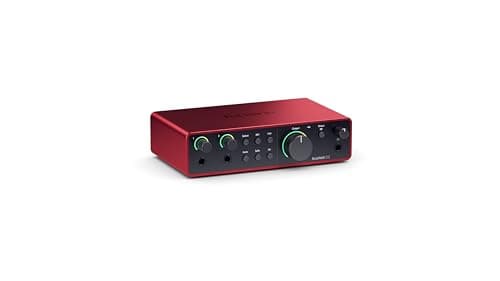
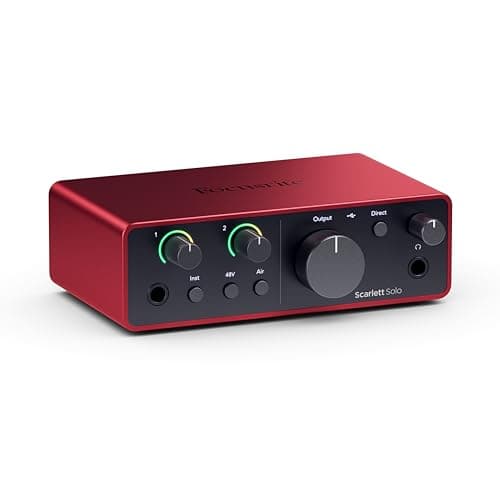
Focusrite Scarlett 2i2 (4th Gen)
Top pickFocusrite · The most gain per dollar in a two-input box
The default answer for someone buying an SM7B or PodMic: it supplies enough clean gain that you never need a booster, which makes it the cheaper total purchase even when it is not the cheaper box. Look elsewhere only if you need MIDI or four outputs.
Why it is here
- 69 dB is the most gain of any interface at this price, and enough for an SM7B with headroom to spare
- 120 dB dynamic range means the converters are not the weak link
- Two inputs, so a second person does not mean a second purchase
What it costs you
- Air mode is a fixed voicing, not an EQ you can dial
- Plastic-and-metal build feels less solid than the SSL or Audient competition
- No MIDI, which matters if you also play keys
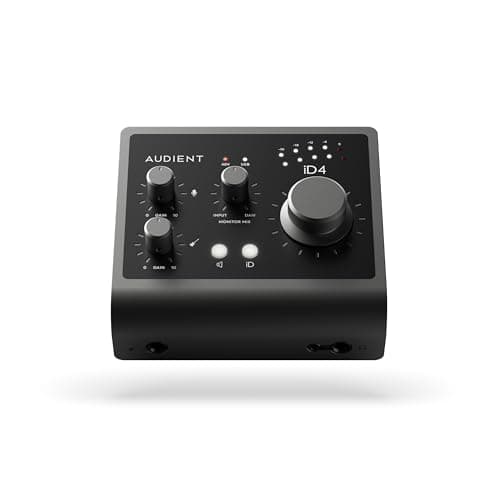
Audient iD4 MKII
Audient · The best-sounding single preamp here
The right box if your mic is a condenser or a hot dynamic and you want the cleanest single channel at this price. If you are buying an SM7B, 58 dB puts you straight back into booster territory.
Why it is here
- -129 dB(A) EIN and 0.0017% THD+N are numbers you would expect a tier up
- The Class A preamp is the same circuit family as Audient's consoles
- Two headphone outputs on a one-input box, which is unusual and useful
What it costs you
- 58 dB is not enough for an SM7B without a booster
- One mic input only
- No onboard DSP or voicing
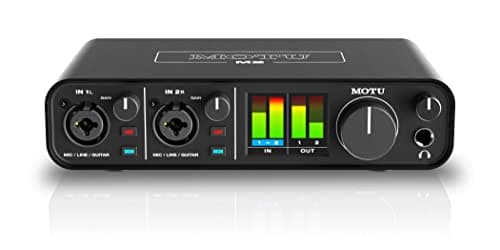
MOTU M2
MOTU · The best converters and metering at the price
The pick if you care most about conversion quality and want to see your levels without alt-tabbing. If your mic is an SM7B and you want a published gain number you can check against the mic's sensitivity, the 2i2 is the safer buy.
Why it is here
- -129 dB EIN is genuinely quiet, and it shows on low-output dynamics
- Full-color LCD metering on the box is more useful day to day than any software mixer
- Independent phantom power and monitor switching per input
What it costs you
- MOTU does not publish a maximum mic-gain figure the way Focusrite does, so gain headroom is harder to plan around
- No onboard voicing or DSP at all
- Loopback needs the software, not a front-panel switch
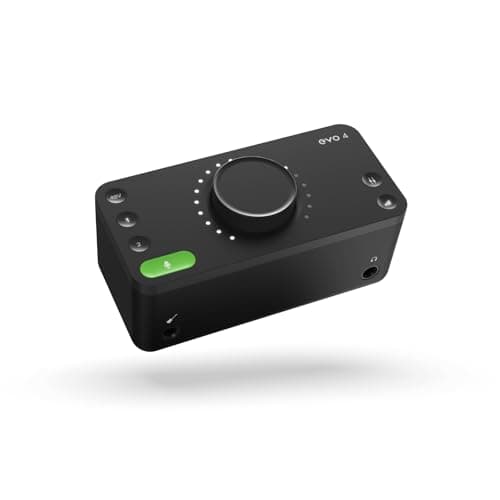
Audient EVO 4
Audient · Anyone who keeps getting gain-staging wrong
The pick for a second host on a budget, or for anyone whose recordings keep coming back too quiet. Not the pick if your mic is an SM7B, where the gain ceiling forces a booster.
Why it is here
- Smartgain removes the single most common beginner mistake in one button
- Two mic preamps at the price of most one-input boxes
- Genuinely small and bus-powered
What it costs you
- 58 dB again falls short of an SM7B's appetite
- Single encoder for everything means more button-pressing than knob-turning
- Plastic build
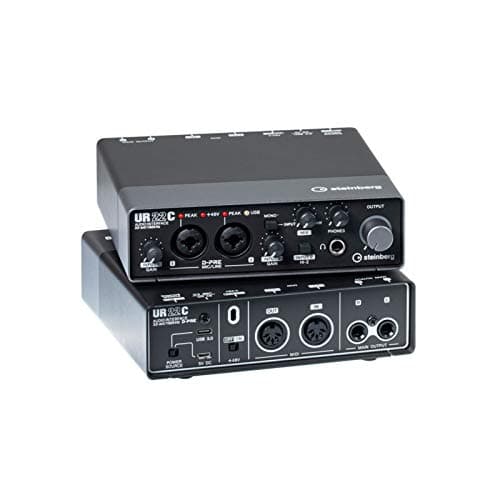
Steinberg UR22C
Steinberg · Windows driver quality and a hardware loopback switch
The pick on Windows if driver stability and a physical loopback switch matter to you. The missing gain figure makes it a gamble with a low-output broadcast dynamic — pair it with a hot microphone.
Why it is here
- A hardware loopback switch rather than a software setting, which is the difference between streaming working and streaming needing a manual
- Yamaha-lineage Windows drivers, historically the most stable in this price band
- MIDI in and out plus onboard DSP monitoring FX
What it costs you
- Steinberg does not publish a maximum mic-gain figure, so you cannot plan a gain budget for a quiet dynamic
- The DSP FX are monitoring-only and add nothing to the recording
- 32-bit conversion is a headline number rather than an audible advantage
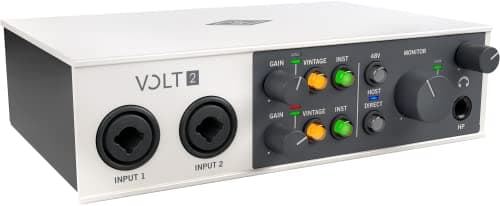
Universal Audio Volt 2
Universal Audio · A hardware color option on the way in
Buy it if you want character on the way in and your mic is a condenser or a hot dynamic. With a low-output broadcast dynamic, 55 dB means a booster, and that changes the price comparison entirely.
Why it is here
- Vintage mode is a real analog-style color, not a plug-in you could add later
- Two combo inputs and a clean, legible front panel
- The UA software bundle is worth actual money
What it costs you
- 55 dB is the lowest gain ceiling in this group and the least SM7B-friendly
- 112 dB dynamic range trails the Focusrite and MOTU converters
- Vintage mode is a commitment printed into the recording
Focusrite Scarlett Solo (4th Gen)
Focusrite · One microphone, one guitar, nothing else
Fine with a hot mic like an MV7+, a BP40 or an SM58. Do not pair it with an SM7B unless you are also buying a booster, and at that point the 2i2 is cheaper overall.
Why it is here
- Same converter generation as the 2i2 for less money
- A dedicated instrument input means mic and guitar at once
- Small enough to live permanently on a crowded desk
What it costs you
- One mic input is a hard ceiling — a guest means a new interface
- Historically the interface people pair with an SM7B and then wonder why it hisses
- No MIDI
Why the Scarlett 2i2 wins on a tablet specifically
Two reasons, and neither is converter quality. The first is that Focusrite maintains an iOS and iPadOS compatibility page that lists the Solo and 2i2 as supported on both Lightning and USB-C iPads, broken out by iPadOS version, with the larger Scarletts marked as untested. That is the most specific commitment any manufacturer in this group makes, and on a platform where the failure modes are quiet and confusing, specificity is worth money.
The second is 69 dB of published mic gain. An iPad setup is usually a mobile setup, and a mobile setup is usually a podcast or an interview, which means a dynamic microphone. How much clean gain do you need has the arithmetic, and the conclusion is blunt: an SM7B wants something close to 60 dB before the preamp's own noise becomes audible. The 2i2 is the only interface here that clears it with headroom, and the alternative is carrying an inline booster as well as the interface, which defeats the point of a tablet rig.
The honest cons stand: there is no MIDI, the build is the least substantial in this group, and Air mode is a fixed voicing rather than an EQ you can dial back. On an iPad, where you may not have a plug-in chain available, a fixed voicing you cannot undo is a slightly bigger commitment than it is on a desktop.
The phantom power problem, and who solves it
If your microphone is a condenser, this is the section that matters. Phantom power is 48 V generated inside the interface from the bus, and generating it is one of the more demanding things a small interface does. When the host cannot supply enough current, the symptom is not a clean failure — it is a thin, noisy, low-output recording that sounds like a bad microphone.
Audient is the only brand in this group that addresses it head-on in writing, stating that the iD4's True Phantom Power delivers a full 48 V per channel even when bus powered. Audient also recommends using the iD4 with USB-C enabled iPads rather than older models, which is the right caveat to publish. If your rig is an iPad plus one condenser and you want no power brick in the bag, the iD4 MKII is the pick, and its -129 dB(A) EIN and 0.0017% THD+N are a tier above what the price suggests.
What it costs you is a second input and gain headroom. 58 dB is fine with a condenser and marginal with an SM7B, and one mic input means a guest needs a different interface. Best audio interfaces for multiple mics is the page for that case.
No desktop app means the front panel has to be enough
This is the trap that catches the most people, and it is worth being specific about. Focusrite does publish a Focusrite Control 2 app for iPhone and iPad — but it is a remote control for a Scarlett connected to a *computer* on the same network, and its own compatibility notes say it cannot control interfaces connected over USB to a mobile device. Audient's EVO mixer software is macOS and Windows. MOTU's loopback routing lives in its driver.
The practical rule: on an iPad, assume you get exactly what is on the box. That reorders the field in two useful ways.
- The MOTU M2's front-panel color metering becomes genuinely valuable rather than a nicety. Setting levels by looking at the hardware is the only way to set them when there is no mixer window to open.
- The Steinberg UR22C's hardware loopback switch is the only loopback in this group you can actually use from an iPad. Everything else routes loopback in software that does not run on iPadOS.
- The Audient EVO 4's Smartgain button is on the hardware, so the one feature most likely to save a mobile recording works with no app at all.
- The Volt 2's Vintage Mic Preamp mode is a physical switch, which means the one piece of analog color here is available to you where a plug-in would not be.
Connectors: what you need in the bag
A current USB-C iPad and a USB-C interface is a single cable and nothing else. That covers the MOTU M2, the Scarletts, the Audients and the UR22C, all of which are USB-C devices.
An older Lightning iPad needs Apple's Lightning to USB Camera Adapter in between, and on some interfaces it also needs external power — Universal Audio's position on the Volt range is explicit about this, requiring both the camera adapter and the external power supply on anything that is not a USB-C iPad. If you are on Lightning hardware, budget for the adapter and a power supply and assume you will need both.
One more practical point that applies to every interface here: do not put an unpowered hub or a cheap multiport dongle between the iPad and the interface. A tablet already has less current to give than a laptop, and splitting it across a hub is where most of the reported dropouts come from. If you need to charge the iPad while recording, use a powered hub or an interface with its own power input.
What we did not pick, and why
- The SSL 2+ MKII. It is one of the best interfaces on this site and we recommend it elsewhere, but Solid State Logic's published compatibility documentation covers macOS and Windows only and makes no iOS or iPadOS claim. Forum reports are not a compatibility statement, so it is not on this list. For a desktop it is still an excellent buy — see SSL 2 vs Audient iD4.
- The Behringer UMC204HD. Behringer's product page describes a USB 2.0 connection to a computer, publishes no maximum gain figure and makes no iPadOS claim. It is the right answer when the alternative is not recording at all, which is why it sits on the under $100 page and not here.
- Thunderbolt interfaces. There is no useful iPad path, and they cost several times more for latency gains a tablet workflow will never notice. Are Thunderbolt audio interfaces worth it covers the desktop case.
- Anything whose core routing requires a desktop utility. If loopback or monitor mixing only exists in a Windows or macOS app, that feature does not exist on your iPad, and paying for it is paying for nothing.
- Larger Scarletts and multi-channel boxes. Focusrite lists the 4i4 and above as untested on iPadOS, and more channels means more current draw on the device least able to supply it.
Pair it with
- A microphone matched to the gain figure. Best XLR microphones for podcasting — and note that only the 2i2 here clears an SM7B comfortably.
- An inline booster, if you already own a low-output dynamic. Cloudlifter vs FetHead covers the tradeoff, with the important caveat that a booster drawing phantom power adds to the same power budget the iPad is already straining.
- Closed-back headphones, because an iPad rig is usually recorded in a room you do not control. Best closed-back headphones for recording.
- A short, good cable. Best XLR cables. Nothing exotic, just not the one that came free with something else.
How to choose
- If your microphone is a low-output dynamic, take the Scarlett 2i2 (4th Gen). 69 dB published is the only figure here that clears it, and the 5 V port is your insurance policy on an underfed iPad.
- If your microphone is a condenser and you want nothing but one cable, take the Audient iD4 MKII — full 48 V on bus power, in writing.
- If you want to set levels by looking at the box, take the MOTU M2 for the front-panel metering, since there is no mixer window on an iPad.
- If two people are recording on a budget, take the Audient EVO 4. Two preamps, and Smartgain is a hardware button.
- If you need loopback from the iPad itself, take the Steinberg UR22C — the only hardware loopback switch here. Budget for the 5 V supply, which is required and not included.
- If you want analog character with no plug-ins available, take the Volt 2 and check your connector first.
- If you want the cheapest documented-supported option and one mic is enough, take the Scarlett Solo (4th Gen).
Is an iPad enough on its own?
For recording two people talking, yes, and that is the honest answer this site will keep giving. An interface, one or two microphones, headphones and a recording app on a tablet will capture a release-quality conversation. What an iPad rig is bad at is the long tail of editing — managing dozens of takes, heavy plug-in chains, anything that wants three windows open at once.
The setup that works in practice is capture on the iPad, edit wherever you normally edit. Nothing on this page locks you into the tablet: every interface here is also a perfectly good desktop interface, which is the main reason to prefer a documented-compatible mainstream box over something built only for mobile. If you are still deciding whether you need an interface at all, do I need an audio interface is the page to read first, and upgrading from USB to XLR covers the step before this one.