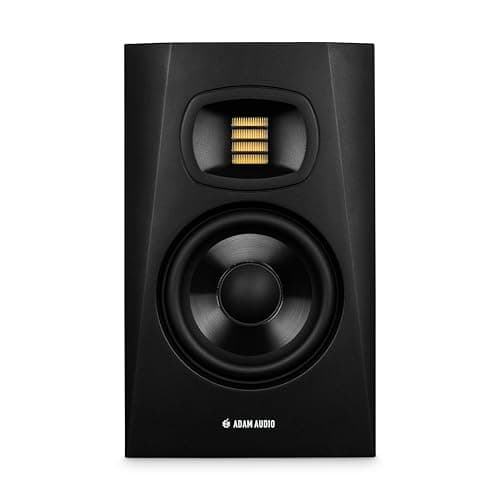
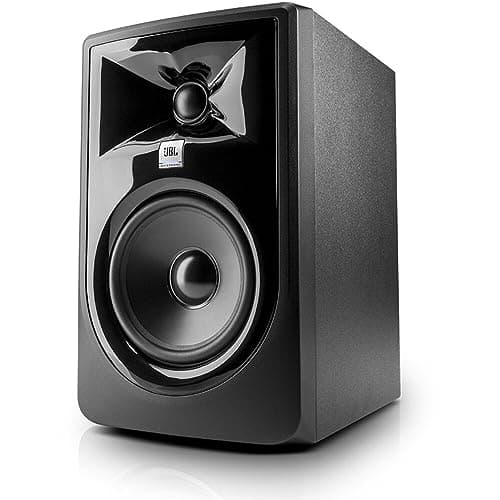
Buy the Adam Audio T5V if your work turns on top-end detail — sibilance, reverb tails, cymbal decay: the U-ART accelerated-ribbon tweeter resolves those more clearly than any dome at this price. Buy the JBL 305P MkII if you want the widest usable sweet spot and the most forgiving listen: its waveguide keeps the stereo image stable when you move, it publishes 49 Hz to 20 kHz at a strict +/-3 dB, and it is the easier speaker to work on for long sessions.
These two are the usual shortlist once you have ruled out the Yamaha and the Kali, and they are more different from each other than almost any other pair at this price. One is built around a ribbon tweeter and a high crossover; the other around a soft dome, a molded waveguide and a crossover nearly an octave lower. That single design decision drives everything you will notice.
Before reading anything into the response row: Adam quotes 45 Hz at -6 dB and JBL quotes 49 Hz at +/-3 dB. Those are different questions. At the same -10 dB convention JBL publishes 43 Hz, which is lower than Adam's -6 dB figure. The two cabinets are far closer in real low-frequency reach than the headline numbers suggest, and anyone comparing 45 against 49 is comparing a loose tolerance with a strict one.
The crossover point is the real difference
The T5V crosses over at 3 kHz. The 305P MkII crosses at 1725 Hz with a 4th-order Linkwitz-Riley filter. That is close to an octave, and it determines which driver is responsible for the most important band in a mix.
On the T5V, the 5-inch woofer carries everything up to 3 kHz — which includes the entire vocal fundamental range, the body of a snare and the midrange of a guitar. On the JBL, the dome takes over at 1725 Hz, so a tweeter designed for detail handles the upper midrange where consonants and presence live. Neither is objectively right. The JBL's arrangement tends to sound more even through the vocal presence region; the Adam's keeps the ribbon out of a band where it would be working hard, and lets it do what it is best at above 3 kHz.
The practical consequence is that the T5V is the more revealing speaker in the top octave and the 305P MkII is the more even speaker through the upper mids. If you mix spoken word, that favors the JBL. If you make editorial decisions about reverb tails and sibilance, it favors the Adam.
What a ribbon tweeter actually gives you, and what it costs
Adam's U-ART is an accelerated-ribbon design: a folded diaphragm that moves air faster than its own surface moves, which gives it a very light effective mass and a fast transient response. Published out to 25 kHz, it has no audible top-end roll-off at all. On reverb decay, cymbal detail and the tail of a vocal consonant, it resolves things a dome smooths over.
Two costs come with it, and both are real. The first is fatigue: that level of top-end information is tiring over a long session until you adapt to it, and a lot of people never quite do. The second is headroom — 20 W on the tweeter against the JBL's 41 W, and a ribbon is less tolerant of being clipped than a dome. If you mix loud, that is a consideration rather than a footnote.
The JBL's answer is a 25 mm soft dome in a molded waveguide, with the same 41 W behind it as the woofer. Less resolving at the very top, considerably more forgiving, and far better behaved when you push it.
The waveguide, and why the sweet spot matters in a bedroom
JBL's Image Control Waveguide is the 305P MkII's signature feature and the most underrated specification in this comparison. A waveguide shapes the tweeter's dispersion so the off-axis response stays closer to the on-axis response — which means the stereo image and the tonal balance hold together when your head is not in exactly the right place.
In a treated room with a properly set-up equilateral triangle, that is a nicety. In a bedroom where the desk is against one wall, the chair rolls, and you lean over to reach a keyboard, it is the difference between a reference you can trust and one that changes every time you move. Studio monitor placement covers the geometry, and best studio monitors for an untreated room is built around exactly this kind of compromise.
Both monitors, and the midrange reference people compare them to
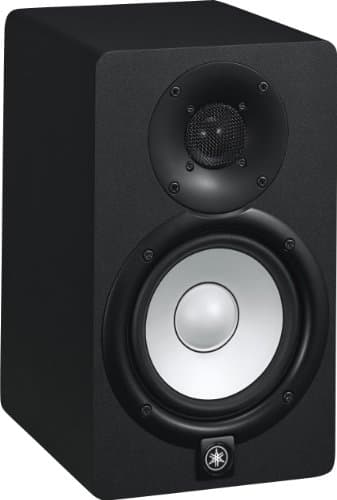
The ribbon-tweeter Adam, the waveguide-loaded JBL, and the Yamaha HS5 — which rolls off at 74 Hz by its own -3 dB figure and is still the midrange benchmark most readers here learned on.
Adam Audio T5V
Top pickAdam Audio · Detail at the top, from a ribbon tweeter
Buy it if your work is voice and acoustic material where sibilance and reverb decisions matter, and you will listen at moderate levels. If you mix loud, or find bright speakers tiring, the HS5 is the safer reference.
Why it is here
- The ribbon tweeter resolves reverb tails and sibilance detail a dome cannot
- 45 Hz from a 5-inch cabinet is excellent
- Response to 25 kHz means no audible top-end rolloff at all
What it costs you
- That top-end detail is fatiguing over a long session until you adapt to it
- 20 W on the tweeter is modest if you mix loud
- Ribbon tweeters are less robust than domes if you clip them
JBL 305P MkII
JBL · The widest usable sweet spot at the price
The right monitor when your listening position is not, and cannot be, the textbook equilateral triangle. If you can sit properly centered, the HS5's flatter midrange is the more useful reference.
Why it is here
- 49 Hz at +/-3 dB from a 5-inch driver is a genuinely good result
- The waveguide gives a wide, stable sweet spot, which forgives a desk you cannot center yourself at
- Magnetically shielded, so it can sit beside a monitor without buzzing
What it costs you
- 108 dB peak SPL is the lowest headroom in this group
- Slightly hyped low end compared with the HS5's flat presentation
- Plastic cabinet
Yamaha HS5
Yamaha · The flat midrange reference for a small room
The right monitor for an untreated or lightly treated small room, precisely because it does not pretend to have low end your room could not reproduce honestly anyway. If you need to hear below 74 Hz, add a treated room before you add a bigger speaker.
Why it is here
- The honest -3 dB figure of 74 Hz tells you what it will not do, which is rarer than it should be
- Midrange is flat and unflattering, which is the entire job of a monitor
- Small enough to sit at ear height on a desk without dominating the room
What it costs you
- Nothing below about 74 Hz, so you mix low end by trust rather than by ear
- Unforgiving — a rough mix sounds rough, which some people hate
- Rear port needs clearance from the wall
Low end: closer than the spec sheets imply, and the room decides anyway
Both are 5-inch two-way cabinets, and both reach into the mid-forties. The JBL's strict +/-3 dB figure of 49 Hz is arguably the more honest number on this page, and its -10 dB figure of 43 Hz is the lowest here.
What neither of them does is give you a trustworthy bottom octave in an untreated room. Low-frequency modes in a bedroom-sized space cause 10 dB or more of variation at the listening position, which is larger than every published difference in the table above. That is the ceiling on what either monitor can tell you, and the fix is not a different speaker. Best bass traps is the only treatment that works in this band, and are expensive studio monitors worth it runs the argument with figures.
Note also what the HS5 column shows: a -3 dB point of 74 Hz, which is most of an octave above either of these. That sounds like a weakness and is sometimes an advantage, because a monitor that reaches lower excites more room modes. In a bare room the HS5's roll-off can produce a more trustworthy low end than a speaker that reaches 45 Hz into untreated corners.
Which to buy
- Voice, acoustic material, reverb and sibilance decisions, moderate listening levels: Adam Audio T5V.
- Desk against a wall, you move while you work, or you mix loud: JBL 305P MkII, for the waveguide and the symmetrical 41 W.
- Mostly spoken word and podcast mixing: JBL 305P MkII — the lower crossover makes the vocal presence region more even.
- You find bright speakers tiring: JBL 305P MkII, without question. The T5V is the opposite of a forgiving monitor.
- Untreated bedroom, midrange accuracy above all: the Yamaha HS5, and accept that below 74 Hz you are working blind.
- You want more real low end than any of these: the Kali LP-6 V2 or the three-way Kali IN-5.
The free upgrades to do first either way
- Get the tweeters to ear height and off the desk surface. A desk bounce arriving a millisecond after the direct sound comb-filters the midrange, and no waveguide or ribbon is immune. Monitor isolation pads vs stands.
- Make the setup symmetrical. Equal distances to the side walls, an equilateral triangle with your head. Asymmetry puts the two speakers in different acoustic environments and destroys the stereo image before the drivers get a chance.
- Move them off the wall behind them, which otherwise adds a broad low-frequency lift you will mistake for extension.
- Set one reference level and return to it. Your bass balance tracks the volume knob, because hearing is less sensitive to low frequencies at low levels. How loud should studio monitors be.
All four are free, and all four matter more than the choice between these two monitors. You will also want balanced outputs feeding them — do I need an audio interface for studio monitors explains why a laptop headphone jack is a different circuit rather than a worse version of the same one.
Neither is a mistake, and the decision is unusually easy to make from your own habits rather than a listening test: if you need resolution at the top, buy the Adam; if you need the image to survive your chair, buy the JBL.
Whatever you choose, feed it from balanced outputs. Both of these take balanced TRS, and the budget interfaces in UMC204HD vs Arturia MiniFuse 2 have them — the MiniFuse 2 publishes two balanced TRS line outputs, which is the connection that keeps a hum out of a cable run along the back of a desk.