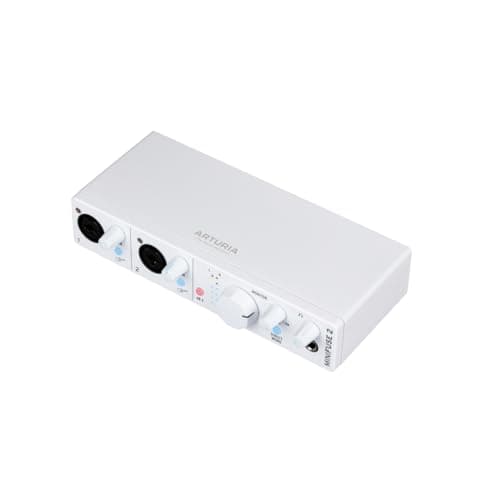
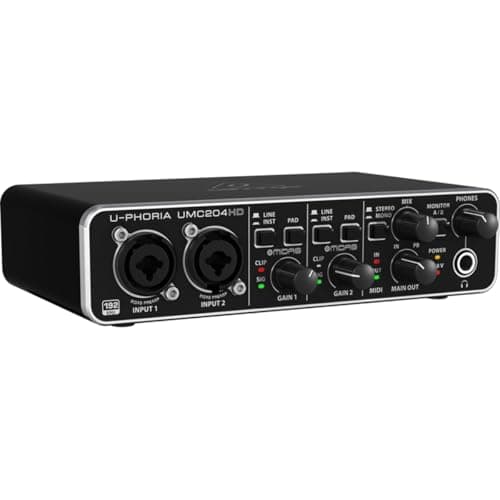
Buy the Arturia MiniFuse 2 if you want a published gain figure and the extras: 56 dB of gain range, 110 dB of input dynamic range, loopback, and a USB Type-A hub port on the back. Buy the Behringer UMC204HD if the budget is the constraint — two XLR/TRS combo inputs with Midas-designed preamps, +48 V, a four-output RCA playback set and 24-bit / 192 kHz for roughly half the money. Both carry `5-pin` MIDI in and out, so MIDI is not the thing that separates them; what the Behringer leaves out is a published gain number.
Both of these are genuine budget-tier interfaces with two microphone preamps and MIDI in and out, which is already more than several pricier boxes offer. The difference is not sound and it is not conversion: it is documentation and a short list of extras. One tells you exactly how much gain it has and adds loopback and a spare USB port; the other tells you less, gives you more analog outputs, and costs less.
The published gain figure is the real difference
Arturia publishes 56 dB of gain range across the mic, line and instrument inputs, and 110 dB of input dynamic range. Behringer publishes neither for the UMC204HD. That is not a trivia gap — it is the single most important number for anyone choosing a microphone, because the capsule's sensitivity and the preamp's gain have to add up.
56 dB is comfortable for any condenser. An AT2035 at -33 dB needs roughly 40 dB for speech and leaves plenty in hand. A Rode PodMic at -57 dBV/Pa is workable. A Shure SM7B at -59.0 dBV/Pa wants about 60 dB, so the MiniFuse 2 is marginal there and the Behringer is a guess. If a low-output dynamic is your microphone, neither of these is the right box without a booster — a FetHead adds `27 dB` in front of whatever you own, and best audio interfaces for the Shure SM7B lists the interfaces that clear it unaided.
Being fair to Behringer: the UMC204HD has a long track record of driving condensers and hot dynamics perfectly well. The problem is that you cannot plan against a number that does not exist, so you are buying on reputation rather than specification. How much clean gain do you need lists the published figure for every interface on this site, and the blanks in that table are informative.
Loopback and the USB port - the two extras that are actually exclusive
- MIDI is on both, so cross it off. Behringer publishes built-in MIDI I/O on 5-pin DIN, 1 in and 1 out, and Arturia publishes the same. If a hardware synth or a controller without USB is why you are shopping, either box covers it and you should decide on something else.
- Loopback. Routes your computer's own audio back into the recording, so a call, a backing track or game audio is captured alongside your microphone. Essential for streaming and remote interviews; irrelevant if you only record a microphone into a DAW.
- A USB Type-A hub port. The quietly useful one. A single USB-C laptop with one spare port, an interface and a MIDI controller is a dongle problem, and the MiniFuse 2 solves it by being the hub. Arturia rates it at 250 mA, so it is for a controller or a dongle rather than a bus-powered drive.
Read that list honestly and the decision usually makes itself. Loopback is binary — either you need it or it is worth nothing to you. The USB port is a small convenience that becomes a real one on a single-port laptop. And MIDI, which is the feature people assume separates these two, does not. Best audio interfaces with MIDI ranks the wider field, and best audio interfaces for streaming ranks on loopback.
Both interfaces, and the next step up
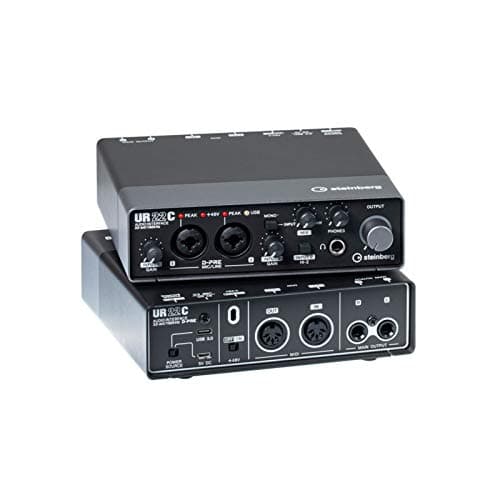
The Arturia with the published figures, the Behringer at the floor of the category, and the Steinberg UR22C if a hardware loopback switch and a mature Windows driver are worth the step.
Arturia MiniFuse 2
Top pickArturia · Mic inputs plus MIDI in one small box
The right buy if you record voice and play keys and want one box for both. If voice is the only job and the mic is low-output, the gain ceiling makes it the wrong tool.
Why it is here
- MIDI I/O at this price is rare and saves a separate interface
- The USB passthrough port is a genuinely thoughtful touch on a crowded laptop
- Two combo inputs
What it costs you
- 56 dB is not SM7B territory
- 110 dB input dynamic range is the lowest here
- Bundle software is less useful than UA's
Behringer U-Phoria UMC204HD
Behringer · The floor of the category, honestly described
Buy it when the alternative is not recording at all, and plan to replace it. With no published gain figure it is a gamble with any low-output dynamic — pair it with a hot mic or not at all.
Why it is here
- Cheapest two-input interface worth plugging a real mic into
- Two combo inputs and phantom power at a price nothing else matches
- Inserts on the inputs, which is unusual this low
What it costs you
- Behringer does not publish a maximum gain figure, so you cannot plan a gain budget from the spec sheet
- Driver experience is the weakest in this group
- Build reflects the price
Steinberg UR22C
Steinberg · Windows driver quality and a hardware loopback switch
The pick on Windows if driver stability and a physical loopback switch matter to you. The missing gain figure makes it a gamble with a low-output broadcast dynamic — pair it with a hot microphone.
Why it is here
- A hardware loopback switch rather than a software setting, which is the difference between streaming working and streaming needing a manual
- Yamaha-lineage Windows drivers, historically the most stable in this price band
- MIDI in and out plus onboard DSP monitoring FX
What it costs you
- Steinberg does not publish a maximum mic-gain figure, so you cannot plan a gain budget for a quiet dynamic
- The DSP FX are monitoring-only and add nothing to the recording
- 32-bit conversion is a headline number rather than an audible advantage
Drivers, and the honest caveat about the bottom of the market
Neither manufacturer publishes a driver-stability figure, because no such specification exists. What is true and worth saying is that the budget interface market's most common failure is not audio quality — it is the driver: crackling under load, a device that disappears after a sleep cycle, a buffer setting that works until you open a browser.
Behringer's drivers have improved considerably across the UMC line's life and remain the weaker half of that package. Arturia is a smaller software company with a narrower hardware range and a reasonable record. If you record on Windows and the sessions matter, the Steinberg UR22C is the box to look at next, because Steinberg builds Cubase and their ASIO driver gets more attention than anyone's at this price. Best audio interfaces for PC treats driver quality as the primary ranking criterion for exactly this reason.
On macOS the argument largely evaporates. Core Audio handles class-compliant devices well and the gap narrows to the feature list. Best audio interfaces for Mac covers that side.
What neither of them has
- A second headphone output. One each. If anyone else is ever in the room tracking with you, look at the SSL 2+ MKII instead.
- Enough gain for a low-output dynamic, with certainty. 56 dB is marginal for an SM7B and the Behringer will not say.
- More than two inputs. Two preamps covers a host and a guest and stops there. Best audio interfaces for multiple mics.
- Onboard DSP for monitoring effects. The UR22C has it; neither of these does, though both do zero-latency direct monitoring.
- Analog voicing. No Air mode, no 4K switch, no vintage preamp emulation — which for spoken word is a feature rather than an omission, since color printed on the way in cannot be undone.
Where the money is better spent
The price gap between these two is small in absolute terms, and it is worth naming what else that difference buys. In an untreated room, low-frequency modes cause 10 dB or more of variation below 200 Hz, and flutter echo off two parallel walls is audible on any microphone. Neither interface touches either problem, and no interface ever will.
If you are choosing between the feature-rich box and the cheap box and you have a bare room, buy the cheap box and put the difference into two panels. Acoustic treatment on a budget costs that out, and does an audio interface improve sound quality is explicit about which parts of an interface change a recording and which parts are sold rather than heard.
Which to buy
- You own `5-pin` MIDI hardware: either box. Both publish MIDI in and out, so let the other rows decide.
- You stream, or record calls and interviews: MiniFuse 2, for the loopback.
- One spare USB port on the whole laptop: MiniFuse 2, for the Type-A hub port.
- Two microphones, hard budget, no streaming: UMC204HD. It does the core job, gives you four RCA playback outputs the Arturia does not, and the difference belongs in the room.
- You need a published gain figure because your microphone is quiet: MiniFuse 2 at 56 dB, and budget for a booster anyway — or step up to a box that publishes 69 dB, like the Scarlett 2i2.
- Windows, and the session matters: the UR22C, for the driver and the hardware loopback switch.

Neither is a mistake. The MiniFuse 2 is the better-documented, better-connected box and the UMC204HD is the honest floor of the category — and if you are still weighing whether the bottom of the market is viable at all, are cheap audio interfaces worth it makes that case with figures.
One last way to read the 56 dB figure: it tells you which microphones are off the table. A hot condenser is a non-issue — even a flagship capsule like the one in Neumann TLM 102 vs Shure SM7B publishes 11 mV/Pa and will sit at a healthy level on either box. The Shure in that same comparison, at -59.0 dBV/Pa, will not.